
Overview
The Challenge:
During crises, civilian volunteer operations rely on chaotic WhatsApp groups and scattered spreadsheets. This creates a severe disconnect between the command center and the field, resulting in duplicated efforts, information overload, and rapid volunteer burnout.
The Outcome:
A real-time Volunteer Command Center platform that replaces messaging chaos with a single source of truth. It streamlines task dispatching via smart matching and provides corporate partners with automated ESG impact tracking.
My Role:
UX/UI Design
User Research
Business Strategy
Strategic Impact
Most civilian volunteer operations fail in two areas: they rely on chaotic WhatsApp groups that prevent rapid scaling, and they suffer from high volunteer drop-off due to slow onboarding and emotional burnout.
Business Goals:


Single Source of Truth
Replacing WhatsApp chaos with a centralized real-time view to prevent field duplications.
Instant Onboarding Breaking the 72h wait barrier with on-demand, location-based task assignment.


Maximize Retention
Preventing emotional burnout through flexible, low-commitment "micro-volunteering".
Data-Driven Monetization Translating volunteer impact into automated ESG reports for B2B corporate sponsors.
The Business Engine: B2B SaaS
While Ogen serves as a critical operational tool for emergency command centers, its financial viability is driven by a B2B SaaS model. By tracking volunteer hours and field data, Ogen automatically generates verified ESG (Environmental, Social, and Governance) reports. This allows corporate partners to sponsor operations and seamlessly quantify their social impact -transforming logistical field data into a highly valuable asset for enterprises.
User Research & Insights
To understand the core friction in crisis volunteer management, I conducted a mixed-methods research phase. The target audience spanned from tech-savvy command center operators to on-the-go field volunteers and retirees.

User Research & Surveys | 6 Participants
Targeted survey and depth interviews with command center operators and field volunteers.

Field & Case Study Research | 16 Sources
Deep-dive analysis of emergency response case studies including MDA, Eran, and civilian command centers.
75%
From Chaos to Control
75% of users struggle with information loss and task duplication in WhatsApp groups.
Design Insight
A column-based "Single Source of Truth" dashboard for real-time task management.

Frictionless Onboarding
Volunteers face a 72-hour delay in traditional NGOs, leading to immediate drop-offs.
Design Insight
1-Click GPS-based onboarding with embedded "Quick Guides" to lower entry barriers.

Stress-Ready Usability
WhatsApp noise is the #1 distraction for field users who require pinpoint location accuracy.
Design Insight
An ultra-minimalist mobile UI with oversized buttons for 1-tap updates under pressure.
Meet Yuval - The Ops Commander
"My WhatsApp is crashing. I need a bird's-eye view to regain control."
Age: 28
Status: Single
Tech Literacy: Expert
Primary Access: Desktop & Mobile
Occupation: Business Development
Work Environment: Open, noisy Command Center

Background
Yuval manages complex civilian logistics through dozens of fragmented WhatsApp groups. She is frustrated by data loss and task duplication, and needs a centralized 'Source of Truth' that responds as fast as she thinks - with zero friction during emergencies."
Motivations
Centralized View: Seeing all field data in one dashboard.
Smart Dispatch: Filtering volunteers by location and skills.
Live Updates: Closing the loop with automated reports from the field.
Frustrations & Fears
Cognitive Overload: Cluttered interfaces during split-second decisions.
Information Gaps: Losing track of volunteers in high-risk zones.
System Lag: Platform failure during sudden emergency surges.
Mapping the System Logic
Before designing the interface, I mapped the system’s core features to ensure a seamless transition from back-office management to field execution.
Feature Prioritization
Must-Have
Unified Dashboard
Task Quota Status
Staffing Progress Bars
Volunteer Profiles
Skill Tags
Real-time Availability
Field Exception Alerts
Alert Filtering
Create New Mission
Set Volunteer Quotas
Manager Mission Closure
Photo Report Review
Targeted Mass Messaging
Group WhatsApp Broadcast
Team-specific WhatsApp
Should-Have
Central System Log
Automated Activity Tracking
Org-Affiliation Visuals
Corporate/Public Distinction
Read-Receipt Tracking
WhatsApp Status Feed
Smart Match
Geo-radius Filtering
Skill-based Filtering
Auto-backup Summoning
No-show Management
Advanced Database Segmenting
Smart List Search
Nice-to-Have
Live Geo-Map
Regional Distribution View
Pulsing Emergency Icons
Corporate ESG Dashboard
Impact Goal Tracking
Corporate Leaderboard
Department Incentives
Marketing Impact Gallery
System-wide Emergency Alert
Global Alert Banner
Corporate Task Assignment
HR Portal Integration
Data Export
Strategic PDF Reports

Product Strategy Insight: To prevent Information Overload, the MVP focuses on a 'Single Source of Truth'. I prioritized the Unified Dashboard and Progress Bars as Must-Haves to eliminate task duplication. Advanced features like Smart-Match and ESG tracking were deferred to later phases to keep the system stable and intuitive during high-pressure emergency peaks.
System Tree
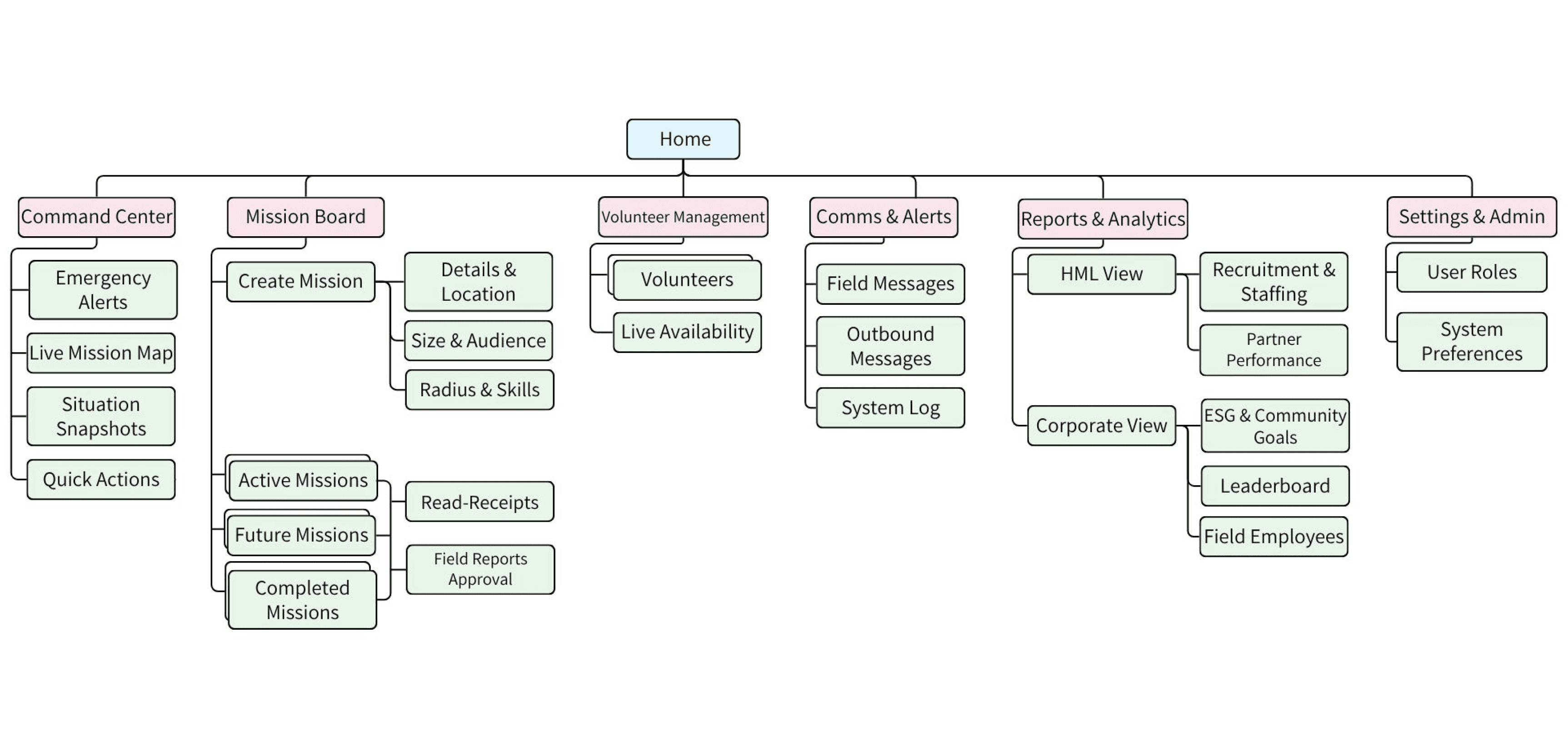
The Core Logic: Streamlined Dispatch & Resolution
I defined key logic flows to address Yuval's conflict: overcoming operational chaos while staying grounded in real-time field reality.
Create New Mission

Real-Time Exception Management

Targeted Operational Communication

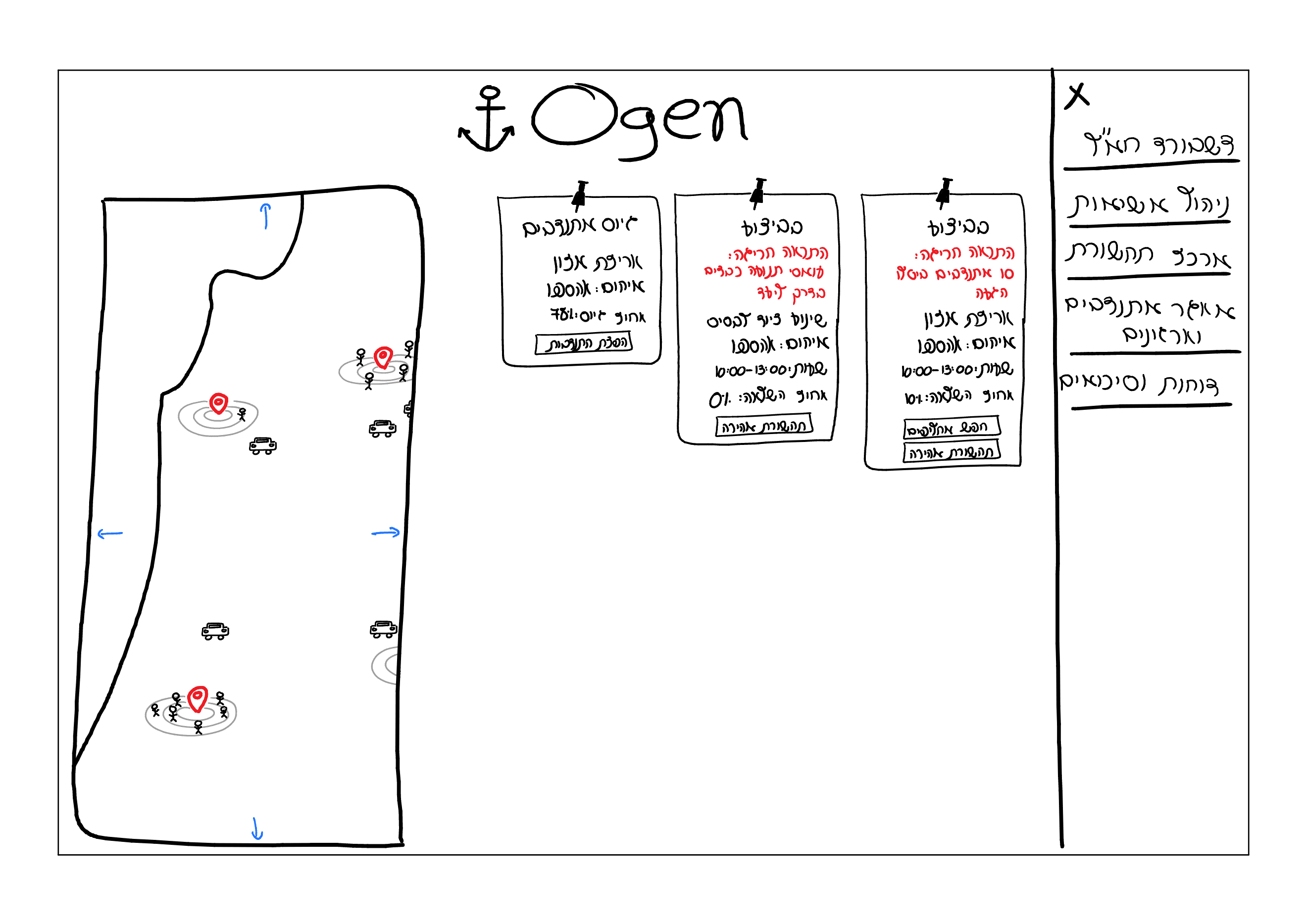
Commanding the Chaos: The Live Dashboard
The Concept
This dashboard features an Interactive Live Map tracking field missions and volunteer clusters in real time, seamlessly paired with a Dynamic Kanban Board that prioritizes tasks with color-coded emergency alerts. Everything is anchored by a Unified Command Sidebar, giving managers instant access to critical dispatches, communications, and logistical reports.
Key Features
Urgency-Driven Kanban: Instant color-coded separation of emergency and routine tasks.
Live Proximity Map: Real-time synchronization of field incidents and nearby responders.
One-Touch Shortcuts: Direct card actions for instant dispatching and rapid replacements.
Bringing Ogen to Life: The Final UI
The final interface bridges the gap between high-stress tactical chaos and everyday logistical usability. By embedding real-time geo-tracking directly into a familiar task-management workspace, the design allows emergency managers to coordinate life-saving field missions with absolute confidence and zero cognitive overload.

Flow 1: High-Urgency Dispatch
Overcoming the "Crisis Chaos" Anxiety
Managing a sudden emergency from scratch can be overwhelming. This flow allows war room managers to leverage smart radius-matching to instantly mobilize field responders, while maintaining absolute control over task quotas and required skills.
1. Universal Intake Activation
Managers can instantly launch a mission from the navigation bar on any page in the system.

2. Urgency Classification
Selecting "Emergency Mode" dynamically streamlines the form, keeping only critical fields to maximize speed.

3. Core Details Logging
The manager quickly logs essential field details, bypassing standard administrative bottlenecks.

4. Proximity Match & Scale
The system dynamically calculates a live-match radius, displaying the precise volume of ready responders.

5. Instant Mass Dispatch
With a single click, emergency alerts are broadcasted, and the live task is pushed straight to the grid.

Flow 2: Real-Time Incident Resolution
Mitigating Staffing Friction
When live missions hit the field, unexpected no-shows and delayed volunteers can jeopardize critical operations. This flow empowers managers to instantly isolate compromised tasks, detect attendance gaps, and deploy immediate background backups with zero phone tags.
1. Anomalous Task Isolation
The manager filters the dashboard to instantly isolate tasks flagged with critical attendance or field alerts.

2. Attendance Friction Inspection
Opening the task details reveals a real-time status tracker of the team, highlighting missing or delayed responders.

3. Fast Proximity Trigger
The manager launches an automated backup search with a single tap directly from the compromised volunteer's profile.

4. Resolution Confirmation
The system dispatches vetted alternatives in the background, instantly updating the deployment status.

Flow 3: Field Verification & Closure
Overcoming Operational Blindspots
Without a centralized ledger, verifying task completion often turns into a chaotic mess of messy phone tags and unorganized chat messages. This flow allows managers to evaluate field-submitted feedback, audit live telemetry, and officially close out operations within a single unified view.
1. Pending Approval Discovery
The manager filters the active dashboard to display tasks waiting for back-office verification.

2. Field Intelligence Review
Opening the task details reveals specific field evidence, notes, and metrics submitted directly by the team on-site.

3. Operational Sign-Off
With a single click, the manager approves the field report, verifying the completion status of the mission.

4. Archive & Ledger Automation
The task is automatically migrated to the "Completed" log, triggering automated sync alerts and clearing the live map.

Refining the Experience: Before & After
Explicit Contextual Actions
Previous State: Action icons were persistently displayed next to specific names, creating small touch targets and visual clutter.

Fix: The entire volunteer row is now a clickable hit area, expanding to reveal an explicit, text-based action menu.

Insight: Usability testing revealed that users needed larger touch targets and explicit text labels for critical actions to prevent accidental misclicks during high-pressure situations.
Frictionless Bulk Selection
Previous State: Selecting a specific subset of volunteers required managers to manually uncheck dozens of individual boxes.

Fix: Introduced a "Select All" macro-toggle, a dynamic search bar, and a quick-filter for anomalous responders.

Insight: Usability testing showed that repetitive manual actions caused severe friction. Adding macro-controls drastically speeds up targeted communication when every second counts.
Scaling Through Code: Key Learnings & Next Steps
1. Vibe Coding & AI-Assisted Prototyping
Instead of relying solely on static Figma screens, I built this entire working prototype directly in HTML using Gemini. This "Code-First" approach allowed me to test real interactive elements-like dynamic modals, live filtering, and toast notifications-and iterate instantly based on actual usability feedback.
2. The RTL (Right-to-Left) Localization Challenge
Next Step: Refining the Hebrew interface. Translating a complex, data-heavy dashboard into a flawless RTL experience presented unique CSS and grid layout challenges. Future iterations will focus on pixel-perfect structural alignment and fine-tuning the typography hierarchy for native Hebrew readers.
3. Continuous Usability Iteration
Next Step: This platform is a living product. Following the initial usability testing, the immediate next phase involves taking the insights from the "frictionless bulk selection" and feeding them back into the code to further optimize the mobile-responsiveness of the command center.
Ogen: From Chaos to Command - Real-Time Mission Control
Naama Sznaidman
HOME